> ## Documentation Index
> Fetch the complete documentation index at: https://mooncamp.com/docs/llms.txt
> Use this file to discover all available pages before exploring further.

# FAQs

> Answers to common questions about Mooncamp

<Frame>
  <img src="https://mintcdn.com/mooncamp/xTmcBNvr03BTmtjW/images/mooncamp-faqs.webp?fit=max&auto=format&n=xTmcBNvr03BTmtjW&q=85&s=99abd4cb288f9c267b19f6cd4078b8bb" alt="FAQs" width="2400" height="1382" data-path="images/mooncamp-faqs.webp" />
</Frame>

## General Tips

<AccordionGroup>
  <Accordion title="Using the right-click function to save time">
    <Frame>
      <iframe src="https://www.loom.com/embed/f8bcd8c10fe5493386235d64787f2e09" title="Loom video player" frameborder="0" className="w-full aspect-video" allow="autoplay; clipboard-write; encrypted-media" allowfullscreen />
    </Frame>

    ## Right-Click Function described

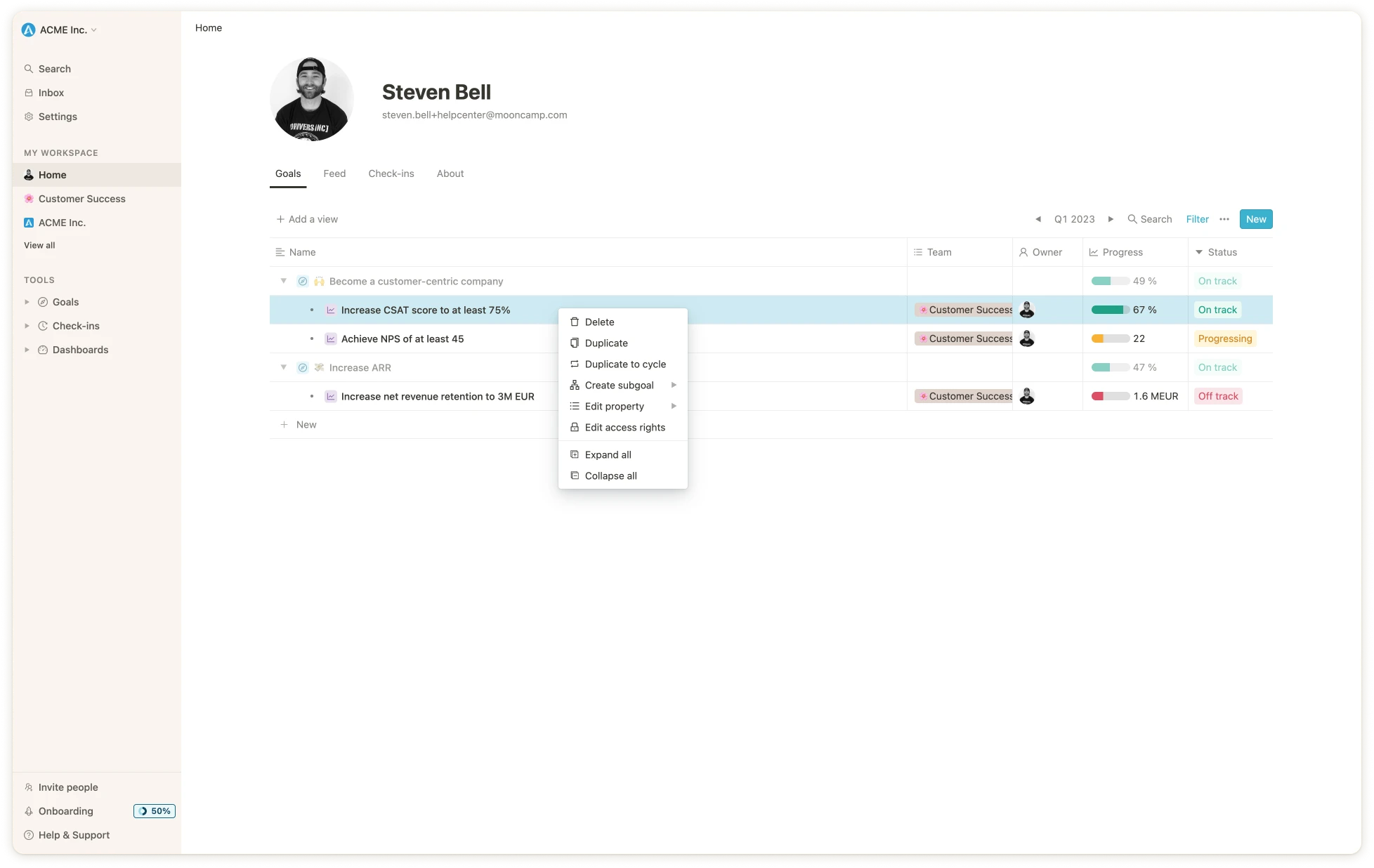
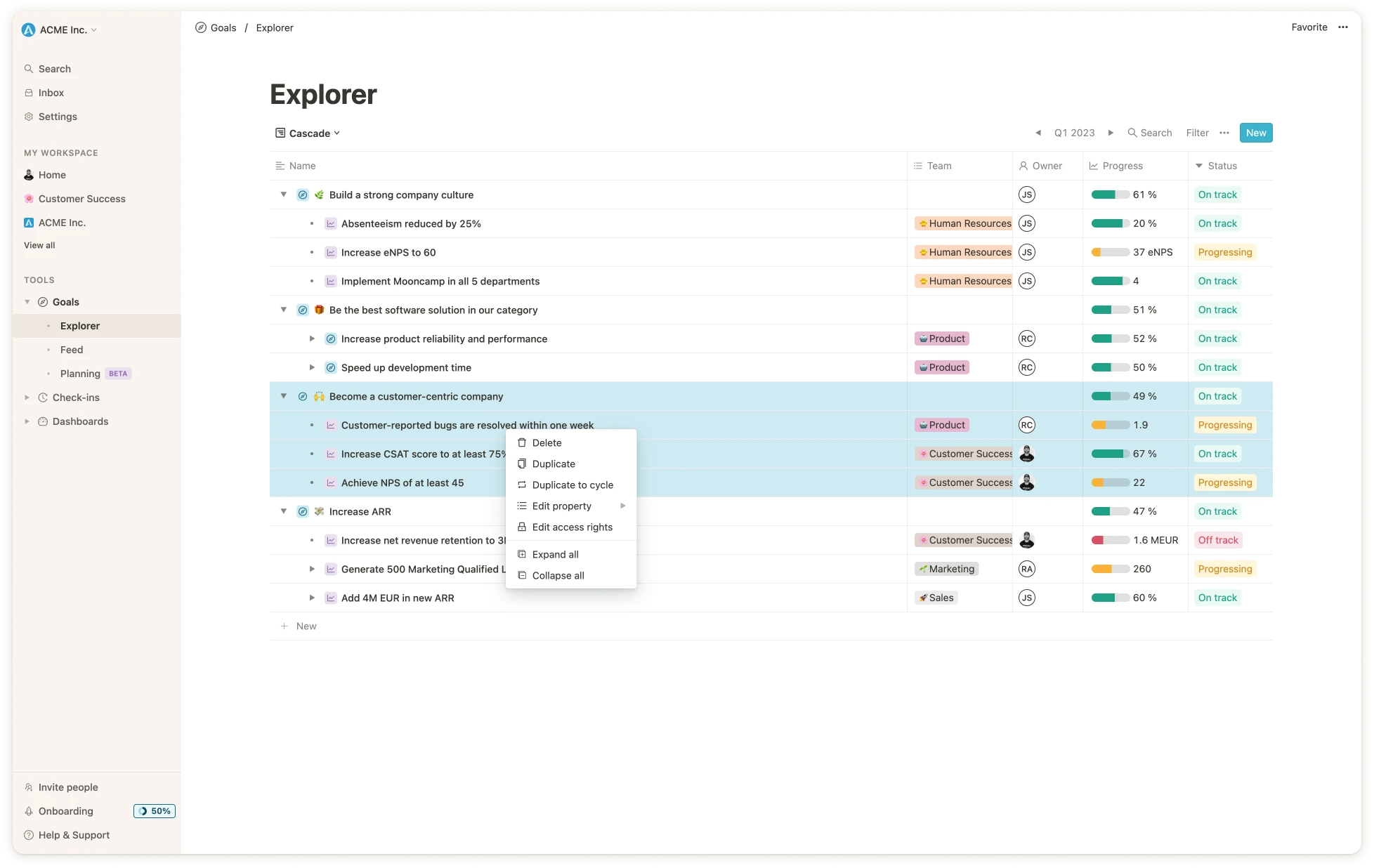
    When you are working in Mooncamp and are looking at a list of your goals, you can hover over a goal and then right-click. You will then be presented with a menu which will give you different options to choose from. You also have the possibility to multi-select a group of goals in order to use the right-click function to bulk-edit your goals. This is quite convenient because you don’t have to open the goal to make changes.

    ## How to use the right-click function

    As stated above, when looking at your list of goals, hover over one and right-click. You will then be presented with the following option:

    * Delete
    * Duplicate - make a copy of the goal
    * Duplicate to cycle - copy a goal to a future cycle
    * Create subgoal - create a sub-aligned goal or child goal
    * Edit property - edit the properties e.g. Cycle, Parent Alignment, Owner etc.
    * Edit access rights - edit who has which level of access to the goal

    <Frame>
      <img src="https://mintcdn.com/mooncamp/aeHHutl4td1OGlYh/images/app.webp?fit=max&auto=format&n=aeHHutl4td1OGlYh&q=85&s=96897c602dcc61999d7937d0657d44d5" width="1956" height="1236" data-path="images/app.webp" />
    </Frame>

    You have the same possibilities with the multi-select except for “Create subgoal”.
    <Frame>
      <img src="https://mintcdn.com/mooncamp/aeHHutl4td1OGlYh/images/app.mooncamp_43.webp?fit=max&auto=format&n=aeHHutl4td1OGlYh&q=85&s=acc95bac4abe68118796253330bdd917" width="1956" height="1236" data-path="images/app.mooncamp_43.webp" />
    </Frame>
  </Accordion>
</AccordionGroup>

<AccordionGroup>
  <Accordion title="How do I log out of Mooncamp?">
    <p>To log out of Mooncamp, follow these steps:</p>

    <ol>
      <li>Look at the top of the left sidebar where you'll see your workspace name (e.g., "Acme Labs")</li>
      <li>Click on the workspace name - this will open a dropdown menu</li>
      <li>Click on "Log out" to sign out of your account</li>
    </ol>
  </Accordion>
</AccordionGroup>

## Team & User Management

<AccordionGroup>
  <Accordion title="How can I add or delete a user in Mooncamp?">
    <Frame>
      <iframe src="https://www.loom.com/embed/d3aeded4e6214681ae761343962e61db" title="Loom video player" frameborder="0" className="w-full aspect-video" allow="autoplay; clipboard-write; encrypted-media" allowfullscreen />
    </Frame>
  </Accordion>

  <Accordion title="How can I change the e-mail address and other data of a user?">
    <Frame>
      <iframe src="https://www.loom.com/embed/a606a4ad2fbc42fda00a279996e54b03" title="Loom video player" frameborder="0" className="w-full aspect-video" allow="autoplay; clipboard-write; encrypted-media" allowfullscreen />
    </Frame>
  </Accordion>

  <Accordion title="How can I import users with a CSV file?">
    <Frame>
      <iframe src="https://www.loom.com/embed/d8b10c05dc644aa489d7ccb42c417906" title="Loom video player" frameborder="0" className="w-full aspect-video" allow="autoplay; clipboard-write; encrypted-media" allowfullscreen />
    </Frame>
  </Accordion>
</AccordionGroup>

## Integrations

<AccordionGroup>
  <Accordion title="How can I best use the Jira Integration?">
    <Frame>
      <iframe src="https://www.loom.com/embed/42903f020c374644818643ec2606a41a" title="Loom video player" frameborder="0" className="w-full aspect-video" allow="autoplay; clipboard-write; encrypted-media" allowfullscreen />
    </Frame>
  </Accordion>

  <Accordion title="How can I connect Mooncamp with specific Issues of a Jira project?">
    <Frame>
      <iframe src="https://www.loom.com/embed/c95ef4cea51941369c298541d8ad8fc5" title="Loom video player" frameborder="0" className="w-full aspect-video" allow="autoplay; clipboard-write; encrypted-media" allowfullscreen />
    </Frame>
  </Accordion>

  <Accordion title="How can I check or update my goals in Slack?">
    <Frame>
      <iframe src="https://www.loom.com/embed/f22821fdb1044c94b80860810dee5bb7" title="Loom video player" frameborder="0" className="w-full aspect-video" allow="autoplay; clipboard-write; encrypted-media" allowfullscreen />
    </Frame>
  </Accordion>
</AccordionGroup>

## Settings & Customization

<AccordionGroup>
  <Accordion title="How can I change the language in Mooncamp?">
    <Frame>
      <iframe src="https://www.loom.com/embed/Changing-the-language-in-my-Mooncamp-account-b6e103d371f44e549cd0c524fa7b3f74" title="Loom video player" frameborder="0" className="w-full aspect-video" allow="autoplay; clipboard-write; encrypted-media" allowfullscreen />
    </Frame>
  </Accordion>

  <Accordion title="How can I setup notifications for news and changes on goals?">
    <Frame>
      <iframe src="https://www.loom.com/embed/13c6f587755e41119c2332906d90c2d0" title="Loom video player" frameborder="0" className="w-full aspect-video" allow="autoplay; clipboard-write; encrypted-media" allowfullscreen />
    </Frame>
  </Accordion>
</AccordionGroup>

## Goal Management

<AccordionGroup>
  <Accordion title="How can I highlight specific goals, views or dashboards in my account?">
    <Frame>
      <iframe src="https://www.loom.com/embed/629a2330f66d42a7b1e415fb6593cecc" title="Loom video player" frameborder="0" className="w-full aspect-video" allow="autoplay; clipboard-write; encrypted-media" allowfullscreen />
    </Frame>
  </Accordion>

  <Accordion title="How can I expand or collapse several goals at once?">
    <Frame>
      <iframe src="https://www.loom.com/embed/4c72976ece714e5eb7f13c8115586919" title="Loom video player" frameborder="0" className="w-full aspect-video" allow="autoplay; clipboard-write; encrypted-media" allowfullscreen />
    </Frame>
  </Accordion>

  <Accordion title="How can I mark goals as achieved or closed or archive them?">
    <Frame>
      <iframe src="https://www.loom.com/embed/5d54ec777d4c48a1af5ddf6fff68b481" title="Loom video player" frameborder="0" className="w-full aspect-video" allow="autoplay; clipboard-write; encrypted-media" allowfullscreen />
    </Frame>
  </Accordion>

  <Accordion title="How can I bulk edit several goals at once?">
    <Frame>
      <iframe src="https://www.loom.com/embed/aad2883f3f824f80993d9b9b06168760" title="Loom video player" frameborder="0" className="w-full aspect-video" allow="autoplay; clipboard-write; encrypted-media" allowfullscreen />
    </Frame>
  </Accordion>

  <Accordion title="How can I rearrange or sort my goals into a different order?">
    <Frame>
      <iframe src="https://www.loom.com/embed/1fe248b259fa4473bc0931c70445d0d1" title="Loom video player" frameborder="0" className="w-full aspect-video" allow="autoplay; clipboard-write; encrypted-media" allowfullscreen />
    </Frame>
  </Accordion>

  <Accordion title="Where do I find deleted goals?">
    <Frame>
      <iframe src="https://www.loom.com/embed/08fc8070aacb45c2a110cb1e81433739" title="Loom video player" frameborder="0" className="w-full aspect-video" allow="autoplay; clipboard-write; encrypted-media" allowfullscreen />
    </Frame>
  </Accordion>

  <Accordion title="How can I allow only specific progress measurement types or specific parent elements per goal type?">
    <Frame>
      <iframe src="https://www.loom.com/embed/319be528aabf402a9e65c0234274bfdc" title="Loom video player" frameborder="0" className="w-full aspect-video" allow="autoplay; clipboard-write; encrypted-media" allowfullscreen />
    </Frame>
  </Accordion>

  <Accordion title="How can I best use the check-in function?">
    <Frame>
      <iframe src="https://www.loom.com/embed/f2b16e3fcc44479e9a089f736daaa8a3" title="Loom video player" frameborder="0" className="w-full aspect-video" allow="autoplay; clipboard-write; encrypted-media" allowfullscreen />
    </Frame>
  </Accordion>

  <Accordion title="How can I create yearly goals, initiatives, tasks, projects or KPIs and link these to my OKRs?">
    <Frame>
      <iframe src="https://www.loom.com/embed/7f00a11b60f242adbd8a7c673e5b119e" title="Loom video player" frameborder="0" className="w-full aspect-video" allow="autoplay; clipboard-write; encrypted-media" allowfullscreen />
    </Frame>
  </Accordion>

  <Accordion title="How can I define and arrange properties on a goal detail page?">
    <Frame>
      <iframe src="https://www.loom.com/embed/3cebf40ee2d64fcbbc377d2fddb793e8" title="Loom video player" frameborder="0" className="w-full aspect-video" allow="autoplay; clipboard-write; encrypted-media" allowfullscreen />
    </Frame>
  </Accordion>

  <Accordion title="How can I display our OKR guidelines in Mooncamp?">
    <Frame>
      <iframe src="https://www.loom.com/embed/c1209655aae84444a06941dea02777b1" title="Loom video player" frameborder="0" className="w-full aspect-video" allow="autoplay; clipboard-write; encrypted-media" allowfullscreen />
    </Frame>
  </Accordion>

  <Accordion title="How can I duplicate my goals into a new cycle?">
    <Frame>
      <iframe src="https://www.loom.com/embed/e4c2c4f9019a46c8afff73b558c7e391" title="Loom video player" frameborder="0" className="w-full aspect-video" allow="autoplay; clipboard-write; encrypted-media" allowfullscreen />
    </Frame>
  </Accordion>

  <Accordion title="How can I hide or remove greyed out parent goals in my cascade view?">
    <Frame>
      <iframe src="https://www.loom.com/embed/4d17a16e859c4881ae4bff66aff9ae9e" title="Loom video player" frameborder="0" className="w-full aspect-video" allow="autoplay; clipboard-write; encrypted-media" allowfullscreen />
    </Frame>
  </Accordion>

  <Accordion title="How can I install Mooncamp as a mobile app?">
    <Frame>
      <iframe src="https://www.loom.com/embed/8779a11eb1c0421f81b47dad034d102c" title="Loom video player" frameborder="0" className="w-full aspect-video" allow="autoplay; clipboard-write; encrypted-media" allowfullscreen />
    </Frame>
  </Accordion>

  <Accordion title="How can I set up goal weighting?">
    <Frame>
      <iframe src="https://www.loom.com/embed/f51284d57bfd4f76a808afd3e2022938" title="Loom video player" frameborder="0" className="w-full aspect-video" allow="autoplay; clipboard-write; encrypted-media" allowfullscreen />
    </Frame>
  </Accordion>

  <Accordion title="How can I use the right-click function to save time?">
    <Frame>
      <iframe src="https://www.loom.com/embed/3de901effa4f4a439620de0933b75041" title="Loom video player" frameborder="0" className="w-full aspect-video" allow="autoplay; clipboard-write; encrypted-media" allowfullscreen />
    </Frame>
  </Accordion>

  <Accordion title="How can I multi-align a goal?">
    <Frame>
      <iframe src="https://www.loom.com/embed/d14656cf6bb84c85be31a102aa80808b" title="Loom video player" frameborder="0" className="w-full aspect-video" allow="autoplay; clipboard-write; encrypted-media" allowfullscreen />
    </Frame>
  </Accordion>
</AccordionGroup>

## Account & Subscription

<AccordionGroup>
  <Accordion title="How do I cancel my Mooncamp subscription or delete my account?">
    To cancel your subscription or delete your account, please reach out to our support team at [support@mooncamp.com](mailto:support@mooncamp.com). After account deletion, your data is retained for 30 days before being permanently removed.
  </Accordion>

  <Accordion title="What happens when I deactivate or delete a user?">
    Both deactivating and deleting a user will free up a license seat. Deactivated users can no longer log in or be assigned to goals, but their historical goal connections remain intact. When a user is deleted, their previously created data is preserved but anonymized. You can manage users under **Settings > Members**. If your organization uses SCIM provisioning, users removed via SCIM are automatically flagged as deactivated.
  </Accordion>

  <Accordion title="Does Mooncamp have a public API?">
    Mooncamp does not currently offer a public API, but it is on our immediate roadmap. If you're interested, please reach out to [support@mooncamp.com](mailto:support@mooncamp.com). In the meantime, Mooncamp offers a wide range of [data integrations](/data-integrations) including Jira, Microsoft Excel, Google Sheets, Salesforce, HubSpot, and more to connect your external data to goals automatically.
  </Accordion>
</AccordionGroup>