> ## Documentation Index
> Fetch the complete documentation index at: https://mooncamp.com/docs/llms.txt
> Use this file to discover all available pages before exploring further.
# Goal Types
> An overview of goal types in Mooncamp
## Goal Types explained
Any goal you create in Mooncamp is generally termed as *goal* and can be assigned with a goal type. If you are using the OKR method, the most commonly used goal types are Objectives and Key Results. These two types are pre-defined in your Mooncamp account. In the sphere of OKRs, organizations use other customized goal types to adapt to their individual goal setting practices. Above the Objective level, e.g. *strategic pillars* or *yearly goals* are used. Below Key Results, organisations work with *projects*, *initiatives* or *tasks*. Further, organizations differentiate between *Company Objectives* and *Team Objectives* or even use different terms for *Objectives* or *Key Results*. Therefore, with Mooncamp you can flexibly customize and create your own goal types.
 ## How to use Goal Types
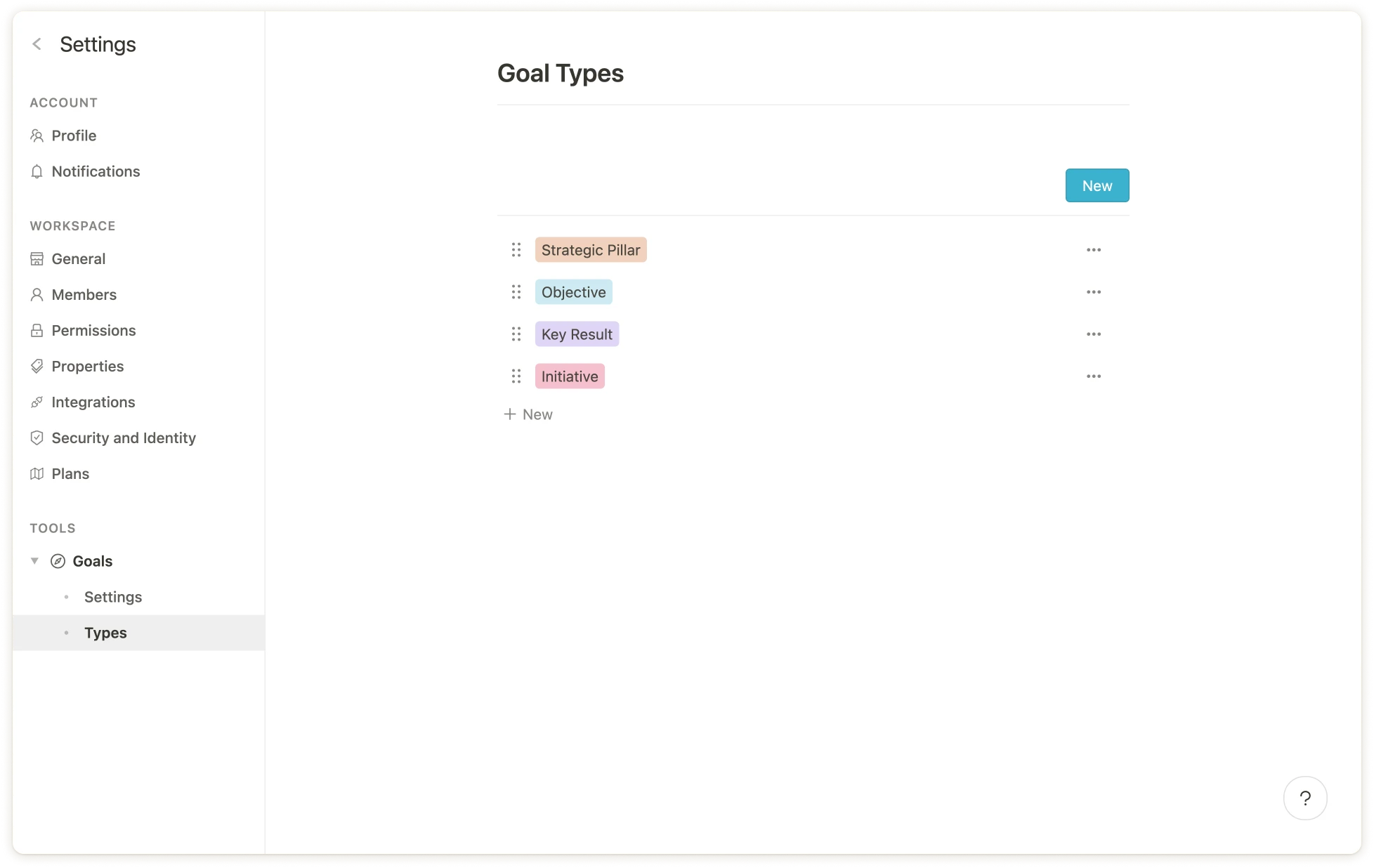
**As an admin**, via *Settings > Goals > Types and rules* you find the two pre-defined goal types *Objectives* and *Key Results*. Via the *New* buttons you can add your own goal types, e.g. Strategic Pillars, Initiatives or Tasks. Once you have a longer list of goal types, the six-point icon on the left helps you to drag and drop them into the chosen hierarchy.
Via the ellipsis `...` next to each goal type you can either edit, duplicate or delete a goal type (the two pre-defined goal types cannot be deleted but renamed). Behind the edit button you can find a range of functions. Under ‘Edit type’ you can specify a name as well as add an icon and a colour to your goal type. Especially the icons can later be quite helpful in larger goal hierarchies to quickly differentiate between the different types at one glance.
All settings below *Properties* support you to create **rules for your different goal types**. These rules inlcude settings regarding the hierarchy between goal types, permitted measurements for goal types or the visibility of properties on a goal detail page for specific goal types (i.e. properties can be set as *required* or *not required* or as *always visible,* *hidden when empty* or *always hidden*). For detailed infos, please navigate to [this article](/goal-rules).
## Useful examples for goal types
As the abbreviation says, the goal types in the common OKR method consist of **Objectives** and **Key Results**. Yet, there are many different ways how organizations adjust the method to their specific needs. Organizations might have the need for another layer above their quarterly objectives and work with **Strategic Pillars** or **Yearly Goals**, which some also call **Mid-Term Goals** (**MOALs**). Further there can be the need to have more granular layers below quarterly Key Results, for example **Initiatives** or specific **Tasks** that might be attached to these. What can also be helpful is to have a direct link between OKRs, **Projects** and **KPIs** in one tool, therefore some organizations also use these two as goal types within Mooncamp. For larger organisations it might be useful to differentiate between Company OKRs and Team OKRs and create specific goal types for these, i.e. **Company Objectives and -Key Results** as well as **Team Objectives and Key Results**.
**Tip:** Setting a **colored icon** for each goal type can be very helpful in keeping a **better overview** in bigger goal hierachies and **distinguishing** the different types at one glance.
## How to use Goal Types
**As an admin**, via *Settings > Goals > Types and rules* you find the two pre-defined goal types *Objectives* and *Key Results*. Via the *New* buttons you can add your own goal types, e.g. Strategic Pillars, Initiatives or Tasks. Once you have a longer list of goal types, the six-point icon on the left helps you to drag and drop them into the chosen hierarchy.
Via the ellipsis `...` next to each goal type you can either edit, duplicate or delete a goal type (the two pre-defined goal types cannot be deleted but renamed). Behind the edit button you can find a range of functions. Under ‘Edit type’ you can specify a name as well as add an icon and a colour to your goal type. Especially the icons can later be quite helpful in larger goal hierarchies to quickly differentiate between the different types at one glance.
All settings below *Properties* support you to create **rules for your different goal types**. These rules inlcude settings regarding the hierarchy between goal types, permitted measurements for goal types or the visibility of properties on a goal detail page for specific goal types (i.e. properties can be set as *required* or *not required* or as *always visible,* *hidden when empty* or *always hidden*). For detailed infos, please navigate to [this article](/goal-rules).
## Useful examples for goal types
As the abbreviation says, the goal types in the common OKR method consist of **Objectives** and **Key Results**. Yet, there are many different ways how organizations adjust the method to their specific needs. Organizations might have the need for another layer above their quarterly objectives and work with **Strategic Pillars** or **Yearly Goals**, which some also call **Mid-Term Goals** (**MOALs**). Further there can be the need to have more granular layers below quarterly Key Results, for example **Initiatives** or specific **Tasks** that might be attached to these. What can also be helpful is to have a direct link between OKRs, **Projects** and **KPIs** in one tool, therefore some organizations also use these two as goal types within Mooncamp. For larger organisations it might be useful to differentiate between Company OKRs and Team OKRs and create specific goal types for these, i.e. **Company Objectives and -Key Results** as well as **Team Objectives and Key Results**.
**Tip:** Setting a **colored icon** for each goal type can be very helpful in keeping a **better overview** in bigger goal hierachies and **distinguishing** the different types at one glance.